8 Best Market Data APIs for AI Stock Analysis (2026)
A vendor-neutral 2026 guide to feeding real stock data into Claude and ChatGPT, with a provider comparison, setup steps, and how to catch AI hallucinations.
Ask ChatGPT what NVDA closed at last Tuesday and it will give you a number. Confident, specific, formatted to two decimals. It might even be right. The problem is you have no way to tell, because a language model with no live data source will invent a plausible price as readily as it recalls a real one. It is exactly the kind of number someone drops into a position-sizing spreadsheet without a second thought, and that is the whole reason this guide exists.
Connecting a large language model to real market data is not hard anymore. What is hard is doing it in a way you can actually trust with money. This guide covers both. First the wiring, provider by provider, for Claude and for ChatGPT. Then the part almost no one writes about: how to verify the model is reading real numbers instead of hallucinating them.
One thing up front, so you are in the right place. If you are building an automated trading bot and care about latency, tick data, and execution plumbing, that is a different job, and we wrote it up separately in best APIs for trading bots. This guide is for people whose main interface is Claude or ChatGPT, not code.
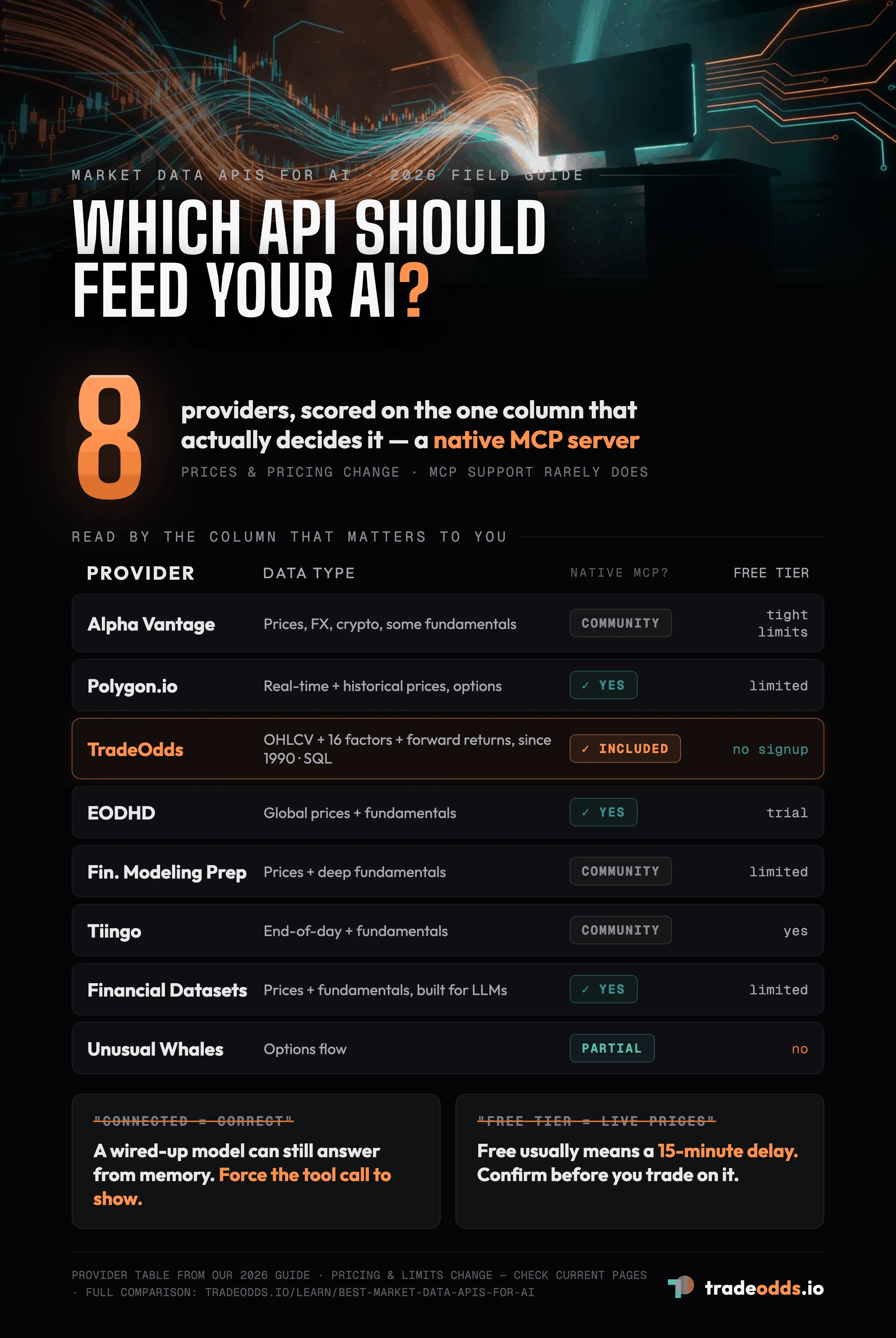
The fastest way to give Claude or ChatGPT real stock data
The shortest path in 2026 is a Model Context Protocol server. MCP is an open standard that lets an app like Claude Desktop call an external tool, get structured data back, and reason over it inside the same chat. You install a small server, drop an API key into a config file, and your model can pull live or historical prices on demand. No custom code, no scraping.
For ChatGPT the equivalent is a connector or a custom GPT pointed at a data provider’s API. Same idea, different plumbing. Both approaches turn a model that guesses into a model that looks things up.
The catch is which data provider sits behind that pipe. That choice decides what you can ask, what it costs, and whether the answer is trustworthy.
Which method should you use?
Before comparing providers, figure out what you are actually trying to do. The right setup for a curious trader is the wrong setup for someone building an automated agent.
- You just want to ask a chatbot about a stock. Use a provider with a ready-made MCP server and connect it to Claude Desktop. Ten minutes, no code.
- You are building an agent or a pipeline. Skip the chat client. Go straight to a REST API with clean JSON and generous rate limits. If it is specifically a trading bot, our trading-bot API guide ranks providers on latency and tick access.
- You need options, Greeks, or fundamentals. Most base providers do prices only. Pick one that explicitly lists the data type you need, or you will hit a wall on question three.
- You want historical depth for backtesting or base rates. Look for decades of history, not months, and confirm the provider serves it in a shape a model can actually digest.
Hold onto whichever of those four you are. It changes the answer in the table below.
Provider comparison for AI workflows
Pricing and rate limits change often, so treat the numbers as a starting point and check each provider’s current page before you commit. What rarely changes is the data type and whether a native MCP server exists, which is usually the real deciding factor. The table is not ranked, so read it by the column that matters to you.
| Provider | Data type | Native MCP? | Free tier | Best for |
|---|---|---|---|---|
| Alpha Vantage (vs TradeOdds) | Prices, FX, crypto, some fundamentals | Community only | Yes, tightly rate-limited | Hobby projects, first experiments |
| Polygon.io (vs TradeOdds) | Real-time + historical prices, options | Yes | Limited | Real-time and options depth |
| TradeOdds | Raw OHLCV + 16 pre-computed factors + forward returns, since 1990 | Yes, included | Yes, no signup | Raw data plus base rates, queryable by SQL |
| EODHD | Global prices + fundamentals | Yes, large tool set | Trial | Non-US and broad coverage |
| Financial Modeling Prep | Prices + deep fundamentals | Community | Yes, limited | Fundamental analysis |
| Tiingo | End-of-day + fundamentals | Community | Yes | Cheap, clean EOD data |
| Financial Datasets | Prices + fundamentals, built for LLMs | Yes | Limited | Agent builders |
| Unusual Whales | Options flow | Partial | No | Options flow signals |
A word on our own row, since this is our site and you should get it straight. TradeOdds gives you the raw bars, the same adjusted OHLCV going back to 1990 that Polygon or Alpha Vantage sell. What sits next to them is the difference: 16 pre-computed factors and forward-return columns, already calculated across 35 years and roughly 3,200 symbols, all queryable by plain SQL. So a power user does not build an indicator pipeline or wait on a compute job. You write one SELECT against a single table and get raw prices, any factor, and the historical base rate for any symbol back in seconds. Setup runs about a minute, not the weekend a raw feed costs you to wire up. More on why that matters in the verification section below.
How to connect Claude to stock data with MCP
Claude Desktop reads a small JSON config file at startup. Adding a data provider means adding one block to that file and restarting the app.
The pattern is the same across providers. Install the server, usually a single command. Open claude_desktop_config.json. Add the server under mcpServers with your API key as an environment variable. Restart Claude. Ask it a question that requires live data and watch it call the tool.
For TradeOdds specifically, you install the server with npm install -g tradeodds-mcp, paste the config snippet from your account page into claude_desktop_config.json, and restart. It exposes list_symbols, analyze_stock, and factor_match on the Pro plan, plus a query tool for direct SQL on Power User and above. Once it is connected you can ask Claude something like “what usually happens to AAPL the day after it gaps up more than two percent,” and it runs the analysis against 35 years of history and hands back a real base rate, not a guess.
For a step-by-step walkthrough using TradeOdds specifically, see how to connect Claude to market data, or five integration patterns beyond MCP if a config file is not your style.
The gotcha with Claude MCP is silent failure. If the config has a typo, Claude does not error loudly. It just answers from memory as if nothing is wrong. Always test with a question you can check.
How to connect ChatGPT to stock data
ChatGPT does not use MCP the same way, so the route differs. You have two practical options in 2026.
The first is a connector or custom GPT wired to a provider’s REST API, where you paste the API schema and ChatGPT calls it when a question needs data. The second, for providers that publish one, is a downloadable data bundle you attach to a project so the model reads from a fixed file instead of a live call.
The live connector is more powerful and more fragile. The static bundle is limited to whatever you uploaded but never hallucinates a number outside it. Pick based on whether you need today’s price or last quarter’s history. For a full no-code walkthrough, see how to build a custom GPT for stock analysis.
How do you know it’s real data and not a hallucination?
Here is the section every other guide leaves out, and it is the one that actually protects your account.
A connected model can still return a wrong number three ways. It can answer from memory before calling the tool. It can call the tool, get data, then round or paraphrase it into something slightly off. Or the data itself can be stale, delayed by fifteen minutes when you assumed it was live. Trusting the setup blindly is how you end up sizing a trade off a fabricated close.
Four habits catch almost all of it.
Force the tool call to show. Ask the model to state which tool it used and paste the raw response before interpreting it. If it cannot show a tool call, it did not make one, and the number is memory, not data.
Spot-check one value. Pick a single figure from the answer and confirm it against the source directly. If it matches, the pipe is working. If it does not, stop and fix the connection before trusting anything else it said.
Know your data’s freshness. Real-time and delayed are different products. Before you act on a price, know whether your provider is feeding live quotes or a fifteen-minute delay, because during market hours that gap is the difference between right and wrong.
Prefer data you can audit. This is where base rates beat black boxes. When TradeOdds tells you a setup closed higher 64 percent of the time, it also lists every matching day with the exact date and return. You are not trusting a model’s summary. You are looking at the source rows it summarized. A number you can trace is a number you can trade.
That last habit is the whole reason we built TradeOdds around observed frequencies instead of predictions. A model can misquote a price. It has a much harder time misquoting a base rate when the matching days are sitting right there for you to count.
What’s the actual free path, and where does it break?
You can absolutely start for free. Several providers, including our own, offer a no-cost tier that is genuinely useful for learning the workflow.
Free tiers break in three predictable places. Rate limits come first, often within a couple dozen calls a day, which dies the moment you point an agent at it. Data delay comes second, since free almost always means delayed rather than real-time. Coverage comes third, with options, fundamentals, and deep history usually locked behind the paid plan.
For a human asking a handful of questions a day, free is fine indefinitely. For anything automated or intraday, you will outgrow it fast, and that is by design.
How much does it cost at real usage?
Two pricing shapes dominate. Flat monthly subscriptions run between ten and several hundred dollars depending on data depth and real-time access. Per-request pricing charges a few cents per call, which is cheaper for light use and can surprise a running agent that loops.
The honest planning question is calls per day, not headline price. A trader asking twenty questions a day lives comfortably in a cheap subscription or a couple dollars of per-request charges. An agent running unattended can generate thousands of calls without noticing, so set a spend cap before you connect one. Most serious providers, ours included, let you cap usage from the account page. Use it.
Feeding historical data to an LLM for backtesting
Historical analysis is where language models get genuinely useful, and where raw APIs get awkward. Handing a model ten years of daily bars as a giant table rarely works. It runs out of context, or it summarizes the data instead of computing on it.
Two better paths exist. Give the model a tool that computes the historical answer and returns just the result, or pre-compute the analysis and feed it the summary. The first is why base-rate providers pair so well with LLMs. Instead of shipping the model millions of rows and hoping, you ask a question and get back the frequency, the median move, and the distribution already calculated from the full history. With TradeOdds that path is a single SQL statement against a daily_metrics table, run from a bot or straight from Claude, that returns the base rate already computed. Thirty-five years in, one answer out.
FAQ
Can I connect an LLM to stock data without coding?
Yes. A provider with a ready-made MCP server and Claude Desktop requires no code, only editing one config file.
Why does ChatGPT make up stock prices?
Because a base model has no live data source. Absent a connected tool, it generates a statistically plausible number, which is often wrong. Connecting real data is the fix.
Is the data real-time or delayed?
It depends entirely on the provider and tier. Free tiers are usually delayed by fifteen minutes. Confirm before you trade on it.
Which stock MCP server is free?
Several offer free tiers. TradeOdds includes MCP access on its paid plan and offers a free dashboard tier for testing the workflow first.
Can I trust an LLM’s stock analysis for real trades?
Only if you can verify its inputs. Force the tool call to show, spot-check a value, and prefer data you can audit. Never trade on a number you cannot trace to a source.
Try It Yourself
Run a free historical analysis on any stock, ETF, or crypto.
Start Free AnalysisNo account required. 10 free lifetime analyses.