5 Ways to Connect Claude to Stock Market Data in 2026
Five ways to give Claude access to historical stock market data: MCP servers, REST APIs, file uploads, Projects, and Custom GPTs, with the tradeoffs of each.
You want Claude — Claude Desktop, Claude Code, or the API — to be able to answer questions about historical market data, run analyses, or write SQL against a real database. There are five practical ways to do this in 2026, ranging from “five-minute setup” to “build your own integration.” Here’s how each works, what it’s good for, and what it’s not.
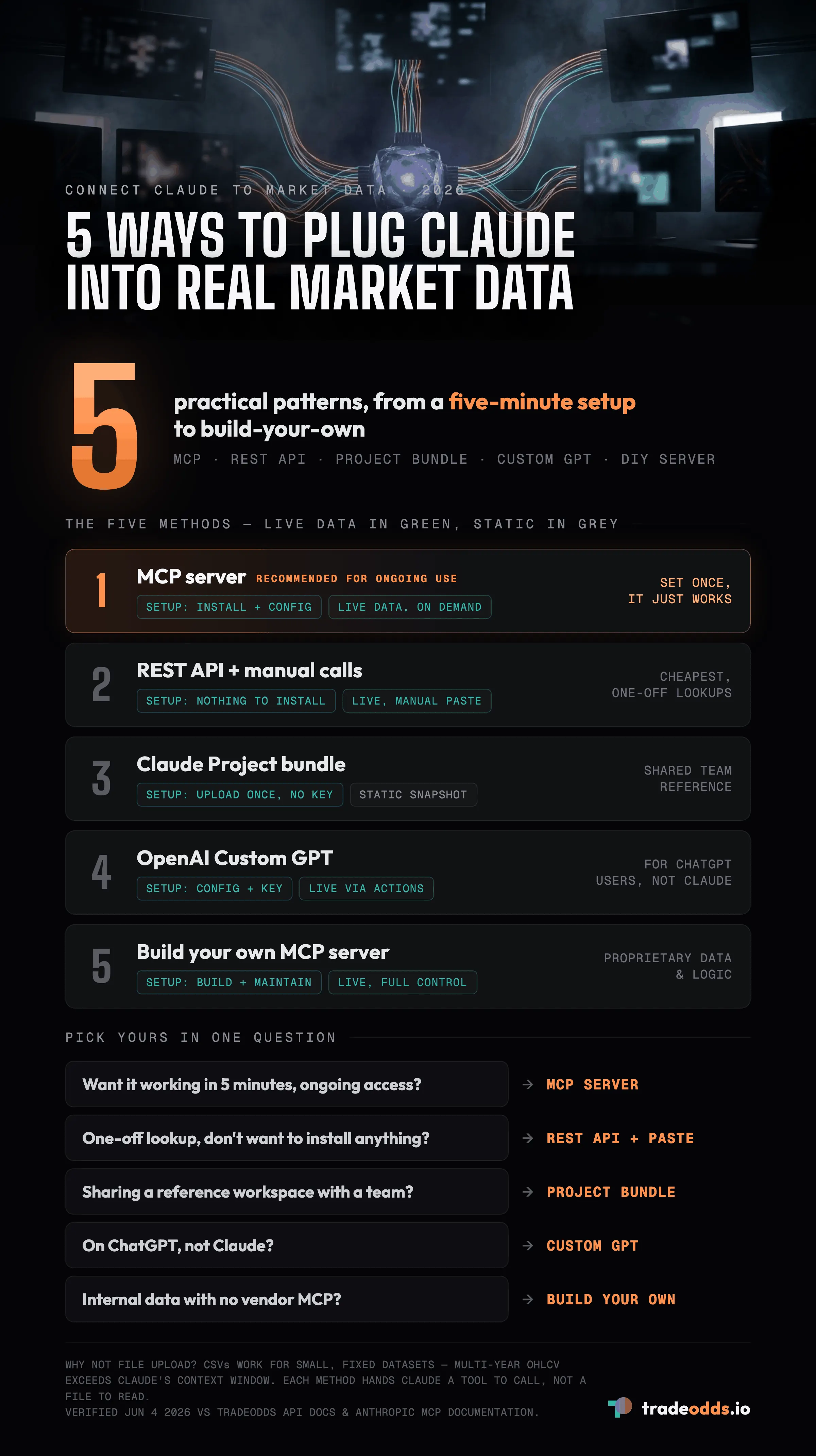
1. MCP Server (recommended for ongoing use)
The Model Context Protocol (MCP) is Anthropic’s open standard for letting Claude call external tools. An MCP server runs locally on your machine, registers itself with Claude Desktop or Cursor via a config file, and exposes tools the model can call mid-conversation.
How it works. You run an MCP server (your own, or one published by a data vendor). Claude sees the tools the server exposes and calls them automatically when it decides they would help answer a question.
Best for. Ongoing use where you want Claude to be able to query market data any time, without you copy-pasting context. Once configured, it just works.
Example: TradeOdds MCP.
npm install -g tradeodds-mcpThen add to ~/Library/Application Support/Claude/claude_desktop_config.json:
{
  "mcpServers": {
    "tradeodds": {
      "command": "tradeodds-mcp",
      "env": { "TRADEODDS_API_KEY": "sk-to-your-key" }
    }
  }
}
Restart Claude Desktop. The analyze, factor_match, query, and list_symbols tools are now available in every conversation. Power User and Quant tiers get the full query tool for direct SQL.
2. REST API + manual calls (cheapest, most flexible)
Have Claude write code that calls a market data REST API directly. You execute the code, paste the response back into the conversation. Works with any data vendor that has an API.
How it works. You ask Claude to write a script that calls the API. You run it locally. You paste the output back. Claude reasons over the response.
Best for. One-off queries, evaluation, or when you don’t want to install anything. Also useful when the data vendor doesn’t ship an MCP server.
Trade-offs. Manual round-trips. Doesn’t compose well across many queries in a single conversation.
3. Claude Projects with a data bundle (no API key needed)
Claude Projects let you upload a fixed corpus of files that the model can reference throughout a conversation. Some vendors publish “Claude Project bundles” — pre-formatted datasets, schema docs, and example queries — that you upload once.
How it works. Download a vendor’s Claude Project bundle (typically a .zip of markdown docs + example datasets). Create a Claude Project, upload the contents. Now every conversation in that Project has access to the bundle.
Best for. Teams that want consistent context across many conversations without managing API keys. Also good for sharing — anyone with Project access has the same context.
Trade-offs. Bundle is static — doesn’t reflect live data updates. Good for documentation and schema reference; not useful for “what is today’s base rate.”
TradeOdds publishes a Claude Project bundle at /api-docs under the Integrations section.
4. OpenAI Custom GPT (for ChatGPT users)
Not strictly Claude, but worth mentioning: ChatGPT Plus users can install Custom GPTs that hit a vendor’s API directly via OpenAI Actions. The same logical pattern as MCP, but for the ChatGPT side.
How it works. Download a vendor’s Custom GPT configuration (the Actions YAML/JSON). Create a Custom GPT in ChatGPT, upload the config, add your API key. The Custom GPT can now call the vendor’s API during any chat.
Best for. ChatGPT users who want the same integrated experience MCP provides for Claude.
Trade-offs. Tied to the ChatGPT ecosystem. Custom GPTs can only be shared with other ChatGPT Plus users.
5. Build your own MCP server (full control)
If you have specific internal data sources or proprietary analysis logic, you build your own MCP server that wraps your stack. The MCP protocol is open and well-documented; Anthropic provides SDKs in Python and TypeScript.
How it works. Write an MCP server in Python or TypeScript that exposes tools (functions Claude can call). Register it with Claude Desktop / Cursor via the same config-file pattern. Claude now sees and uses your tools.
Best for. Internal data, proprietary analytics, or integrations with platforms that don’t yet have official MCP support. Also a learning exercise — understanding MCP from the server side makes you better at evaluating off-the-shelf MCP servers.
Trade-offs. You’re now maintaining infrastructure. Worth it only if no off-the-shelf option covers your needs.
How to choose
- You want it working in 5 minutes, ongoing access? TradeOdds MCP or your data vendor’s MCP if available.
- One-off lookup, don’t want to install anything? REST API + manual paste.
- Sharing a reference workspace with a team? Claude Projects bundle.
- You’re on ChatGPT, not Claude? OpenAI Custom GPT.
- Specific internal data with no vendor MCP? Build your own MCP server.
What about file upload? Why isn’t it on the list?
You can upload CSV files to Claude and have it reason over them. This works for small, fixed datasets but breaks down once you’re looking at multi-year OHLCV, options chains, or anything that exceeds Claude’s context window. The patterns above all sidestep that constraint by giving Claude a tool to call rather than a file to read.
FAQ
What is the easiest way to connect Claude to market data?
An MCP server is the recommended pattern for ongoing use: it is Anthropic’s open standard, and once configured, Claude sees the tools and calls them itself mid-conversation. If you would rather not install anything for a one-off lookup, have Claude write a script that calls a market-data REST API and paste the result back.
Do I need an API key to give Claude market data?
Not always. A Claude Project bundle lets you upload a fixed data pack once with no API key, and every conversation in that project can reference it. MCP servers and REST API calls typically do use a key, since they reach live data on demand.
Can I just upload a CSV of market data to Claude?
You can, and it works for small, fixed datasets. But multi-year OHLCV, options chains, or anything that exceeds Claude’s context window breaks down. The five methods here sidestep that by giving Claude a tool to call rather than a file to read.
What is the difference between an MCP server and a Custom GPT?
They follow the same logical pattern, a tool the model can call during a conversation, but for different assistants. MCP servers integrate with Claude Desktop, Claude Code, or Cursor; a Custom GPT hits a vendor’s API via OpenAI Actions inside ChatGPT and can only be shared with other ChatGPT Plus users.
Which methods give Claude live data versus a static snapshot?
The MCP server, REST API calls, a Custom GPT, and a build-your-own MCP server all reach live data on demand. A Claude Project bundle is a static snapshot, useful for documentation and schema reference but not for questions like today’s base rate.
Verification. Setup steps and product references in this article were verified on June 4, 2026 against the TradeOdds API docs and Anthropic’s published MCP documentation. MCP server commands and config file paths may evolve as the protocol matures.
Disclaimer. TradeOdds provides historical analysis for informational purposes only. This is not investment advice. Past performance does not guarantee future results.
Try It Yourself
Run a free historical analysis on any stock, ETF, or crypto.
Start Free AnalysisNo account required. 10 free lifetime analyses.