How to Write SQL Against Historical Stock Data (Power User Tier, 2026)
Practical guide to writing SQL queries against TradeOdds' indexed 35-year stock market database. Schema walkthrough, query examples, and credit math.
If you’re a Power User or Quant tier subscriber, you can write SQL directly against TradeOdds’ Postgres database via the POST /api/v2/query endpoint. This is the single most powerful surface in the product — every other tool (Analyze, Factor Match, Ask Stanley, the MCP query tool) reads from the same tables. Learning to write SQL against it unlocks workflows the prebuilt tools can’t.
This guide walks through the schema, your first query, and the patterns that make queries fast.
Step 1: Get an API key
In Account → API Keys, create a key. Copy the sk-to-... value once shown.
Step 2: Understand the schema
The primary table is daily_metrics. One row per symbol per trading day, 22+ million rows total. Each row contains:
- Identity:
symbol(text),date(date) - Raw OHLCV:
open,high,low,close,volume,daily_pct_change - Macro factors:
vix_level,vix_bucket,regime_bucket,macro_risk_bucket - Asset factors:
rsi_14,rsi_bucket,streak_bucket,magnitude_bucket,analyst_trend_bucket,earnings_prox_bucket, plus 8 more - Forward returns:
fwd_1d_pct,fwd_5d_pct,fwd_20d_pct
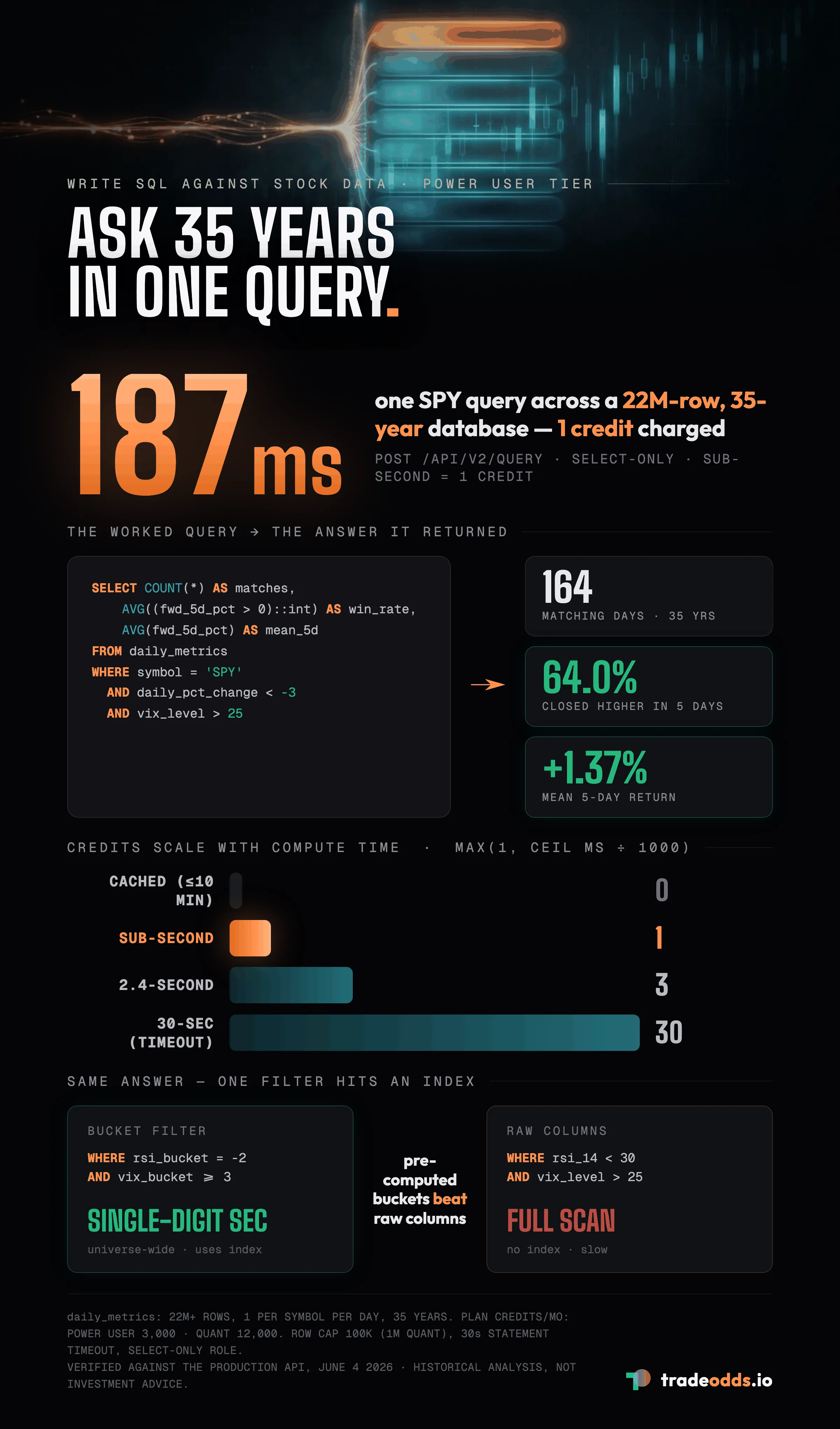
The _bucket columns are pre-computed and bitmasked — that’s what makes universe-wide factor scans return in single-digit seconds. Filtering on rsi_bucket = -2 AND vix_bucket >= 3 hits an index. Filtering on the raw rsi_14 < 30 AND vix_level > 25 does not.
Full schema documentation lives at tradeodds.io/docs/schema. The factor catalog with bucket definitions is at tradeodds.io/docs/factors.
Step 3: Run your first query
The endpoint accepts a JSON body with a single sql field:
curl -X POST https://tradeodds-production.up.railway.app/api/v2/query \
  -H "Authorization: Bearer sk-to-your-key-here" \
  -H "Content-Type: application/json" \
  -d '{
    "sql": "SELECT COUNT(*) AS matches, AVG((fwd_5d_pct > 0)::int) AS win_rate, AVG(fwd_5d_pct) AS mean_5d_pct FROM daily_metrics WHERE symbol = '"'"'SPY'"'"' AND daily_pct_change < -3 AND vix_level > 25"
  }'
You should get back something like:
{
  "rows": [
    { "matches": 164, "win_rate": 0.6402, "mean_5d_pct": 1.3729 }
  ],
  "compute_ms": 187,
  "credits_charged": 1
}
Translation: across 35 years, there were 164 SPY days that fit the conditions. Sixty-four percent closed higher within 5 trading days, with a mean return of +1.37%. One credit charged because the query took 187ms (rounded up to the 1-second minimum).
Step 4: Use the in-browser playground for iteration
The CLI is fine for production, but writing and iterating queries is faster in the playground at tradeodds.io/query-playground. It uses session auth (no API key required when signed in) and renders results as a table with CSV export.
The same query above runs in the playground with one click. Iterating on conditions is fast.
Step 5: Understand credit math
The credit formula:
credits = max(1, ceil(compute_ms / 1000))- Cached query: 0 credits
- Sub-second query: 1 credit
- 2.4-second query: 3 credits
- 30-second query (the timeout): 30 credits
Power User tier includes 3,000 credits/month. Quant tier includes 12,000. At typical analytical workloads (queries finishing under 500ms), you stay well within plan. Heavy multi-symbol aggregations are the most credit-expensive — those are the queries to optimize first.
Step 6: Patterns that go fast
Filter on bucket columns first. The composite indexes cover the common bucket-AND-combinations.
-- Fast (uses index)
WHERE symbol = 'SPY' AND rsi_bucket = -2 AND vix_bucket >= 3

-- Slower (full scan on raw columns)
WHERE symbol = 'SPY' AND rsi_14 < 30 AND vix_level > 25
Use forward-return columns directly. Don’t self-join to compute forward returns.
-- Fast (column lookup)
SELECT AVG(fwd_5d_pct) FROM daily_metrics WHERE ...

-- Slow (window function over 22M rows)
SELECT AVG(LEAD(close, 5) OVER (PARTITION BY symbol ORDER BY date) / close - 1) FROM ...
Limit early. The endpoint enforces a 100K row cap per query (1M for Quant). If your query would return more, you’ll get a truncated: true flag. Add LIMIT clauses to keep things tidy.
Cache hits cost 0 credits. Identical queries within 10 minutes return from cache. Iterating on a query that’s mostly the same shape is essentially free.
Step 7: Write a cross-symbol factor scan
Find every stock currently in a rare setup and rank by historical edge:
SELECT
  symbol,
  COUNT(*) AS historical_matches,
  AVG((fwd_5d_pct > 0)::int) AS win_rate,
  AVG(fwd_5d_pct) AS mean_5d_pct
FROM daily_metrics
WHERE rsi_bucket = -2
  AND vix_bucket = 4
  AND regime_bucket = 1
GROUP BY symbol
HAVING COUNT(*) >= 20
ORDER BY win_rate DESC
LIMIT 20;
This returns up to 20 symbols where the rare setup (oversold RSI + elevated VIX + bull regime) has the highest historical 5-day win rate, restricted to symbols with at least 20 historical instances to avoid noise. Runs in under a second across the entire 35-year universe.
Safety constraints
The query role is SELECT-only at the database level. Attempting INSERT, UPDATE, DELETE, DROP, or any DDL fails with a permission error from Postgres directly. Statement timeout is 30 seconds; runaway queries are killed automatically. Multi-statement queries (separated by semicolons) are rejected by the validator.
These constraints protect TradeOdds and you. There is no way to corrupt the shared database from the query endpoint.
Where to go next
- Schema details: tradeodds.io/docs/schema lists every column with type and meaning.
- Factor catalog: tradeodds.io/docs/factors explains what each
_bucketvalue means. - Use via Claude: the MCP
querytool lets Claude write SQL on your behalf during conversations. See how to connect Claude to market data. - Production usage: the Python SDK (
pip install tradeodds) wraps the same endpoint with retry and credit tracking.
FAQ
How do I run SQL against TradeOdds stock data?
On the Power User or Quant tier, create an API key and POST your query to the /api/v2/query endpoint, or iterate in the in-browser playground using session auth. Every query runs against daily_metrics, one row per symbol per trading day across 22M+ rows and 35 years of history.
How many credits does a SQL query cost?
Credits equal max(1, ceil(compute_ms / 1000)). A sub-second query costs 1 credit, an identical query cached within 10 minutes costs 0, and the 30-second statement timeout caps any single query at 30 credits. Power User includes 3,000 credits a month and Quant includes 12,000.
Why are bucket columns faster than raw columns?
The _bucket columns are pre-computed and bitmasked, so filtering on rsi_bucket = -2 AND vix_bucket >= 3 hits a composite index and scans the whole universe in single-digit seconds. Filtering the raw rsi_14 < 30 AND vix_level > 25 forces a full table scan and runs much slower.
Can a SQL query modify or damage the shared database?
No. The query role is SELECT-only at the database level, so INSERT, UPDATE, DELETE, DROP, and any DDL fail with a Postgres permission error. Multi-statement queries are rejected by the validator and a 30-second timeout kills runaway queries automatically.
Verification. Schema field names, credit formula, and endpoint behavior verified on June 4, 2026 against the TradeOdds production API.
Disclaimer. TradeOdds provides historical analysis for informational purposes only. This is not investment advice. Past performance does not guarantee future results.
Try It Yourself
Run a free historical analysis on any stock, ETF, or crypto.
Start Free AnalysisNo account required. 10 free lifetime analyses.